Navigate to the Human Agent page in your dashboard.
View, manage, and respond to live user chats in real-time.
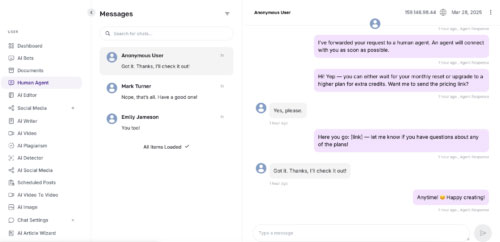
The Human Agent for External Chatbot extension allows your users to seamlessly switch from AI to live human support via chat, directly from an external chatbot. You can manage and respond to live conversations in real-time through your dashboard.
Go to Ably and create an account.
In the Ably dashboard, navigate to the API Keys tab.
Click “Generate New API Key” and copy:
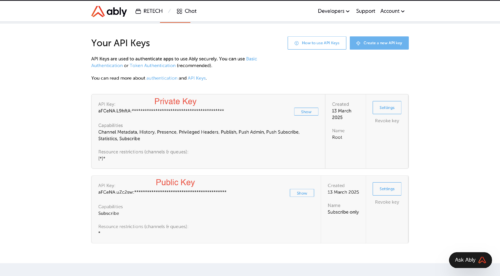
The “Root” key as your Private Key
The “Subscribe Only” key as your Public Key
Go to API Integration > Ably Settings in your dashboard.
Enter your Public Key and Private Key in the relevant fields and save.
Go to the AI Bots page from your dashboard.
Create a new bot or edit an existing one.
In the chatbot settings, choose your Interaction Type:
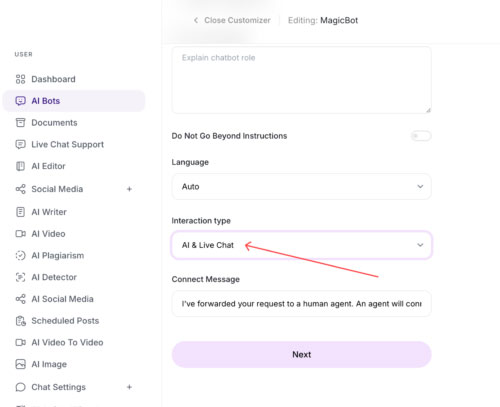
AI & Live Chat
Only AI
Only Live Chat
If Live Chat is enabled, users will see a “Get More Help” button in the chatbot window, allowing them to request human assistance.
Navigate to the Human Agent page in your dashboard.
View, manage, and respond to live user chats in real-time.
✅ Seamlessly transition from AI to human support
✅ Real-time live chat interaction with customers
✅ Centralized chat management from your dashboard